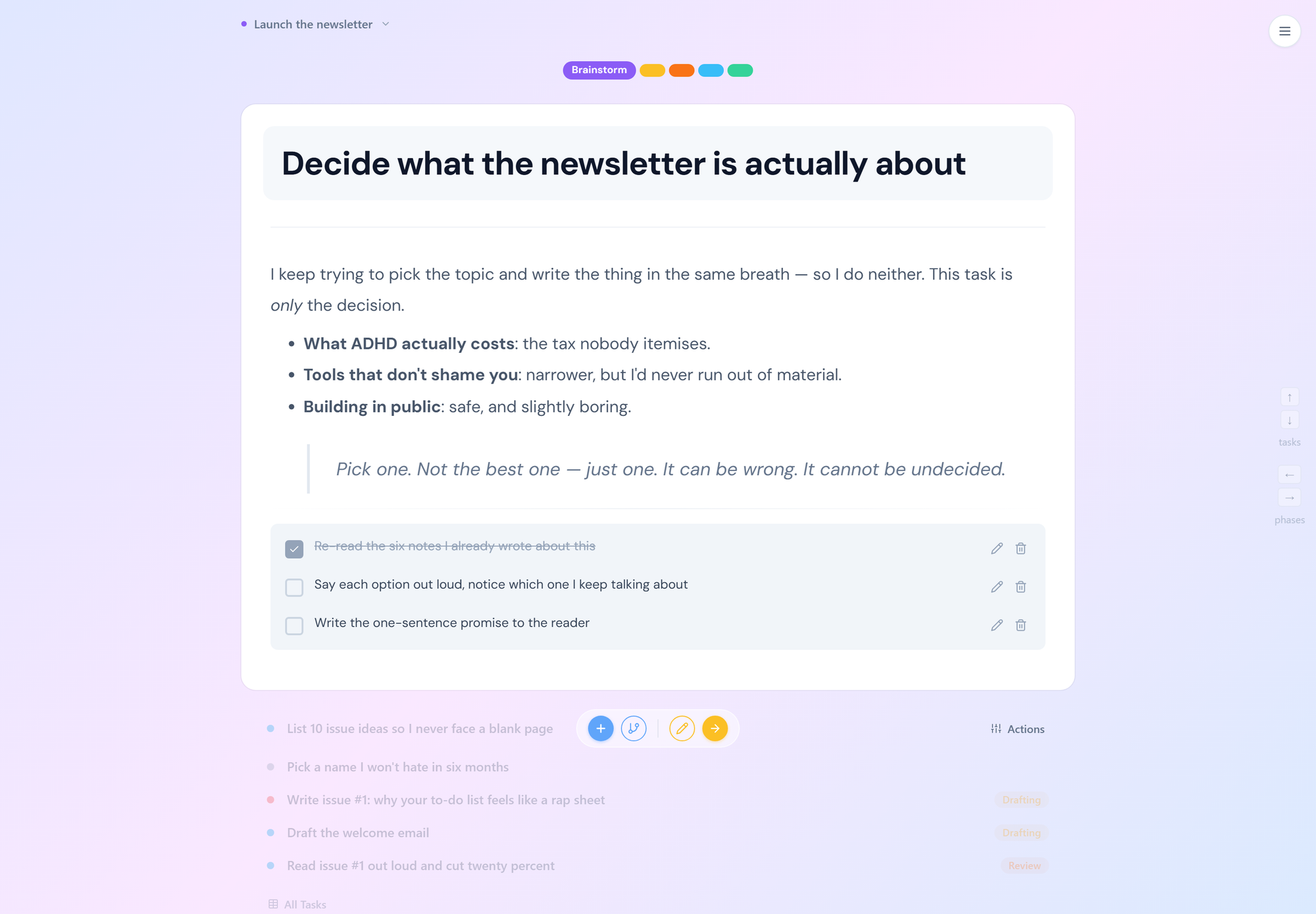
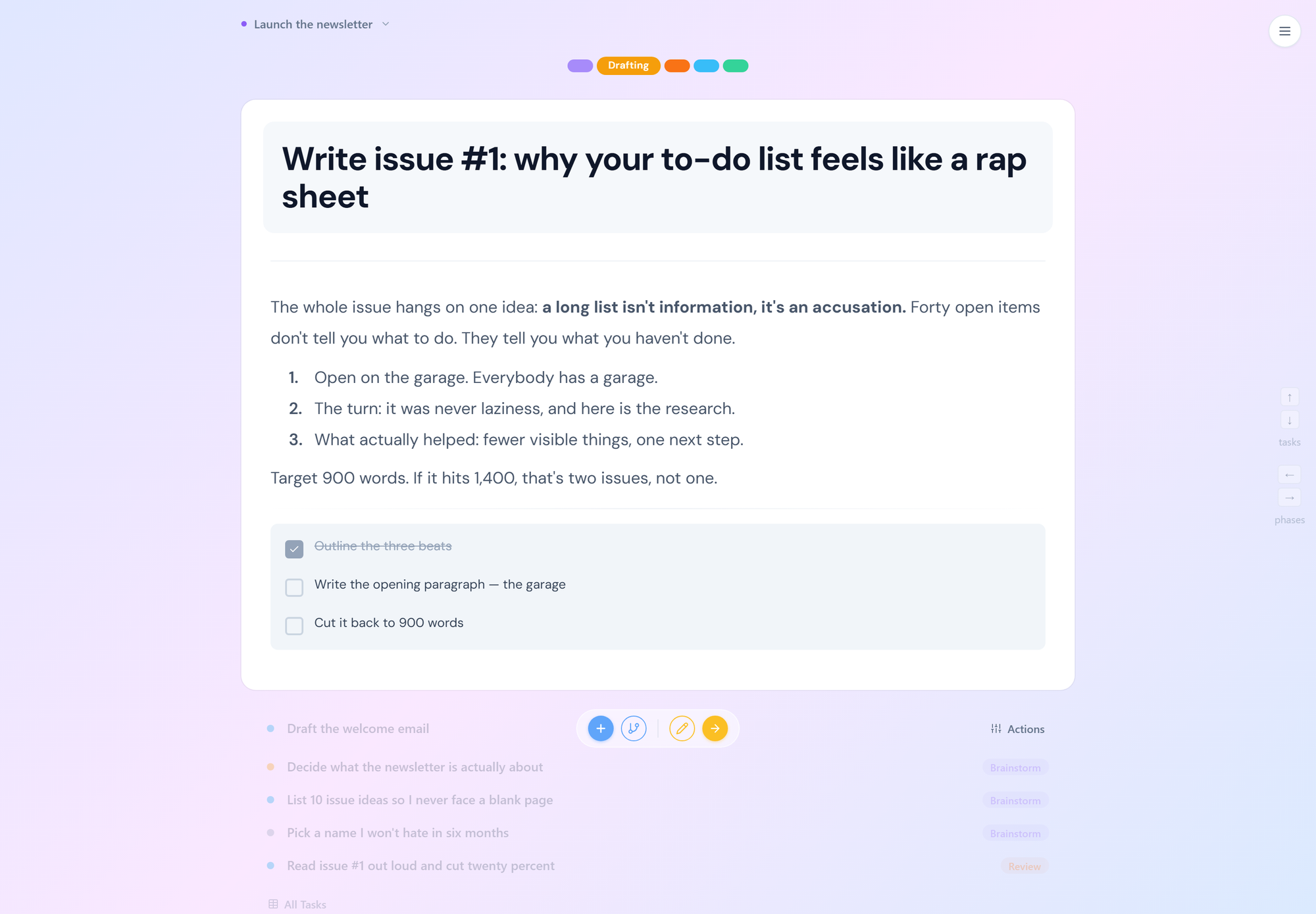
One task. Five waiting. Everything else is somewhere else.
Just Five.
Because the moment you see all forty, something in you quits. You know that feeling. The list loads, your chest tightens, and before you've done a single thing you already feel behind, already feel like the person who won't finish. Science calls it choice overload. We call it the reason we only show you five tasks. The rest wait, silently, where they can't hurt you.
Auto-Dim.
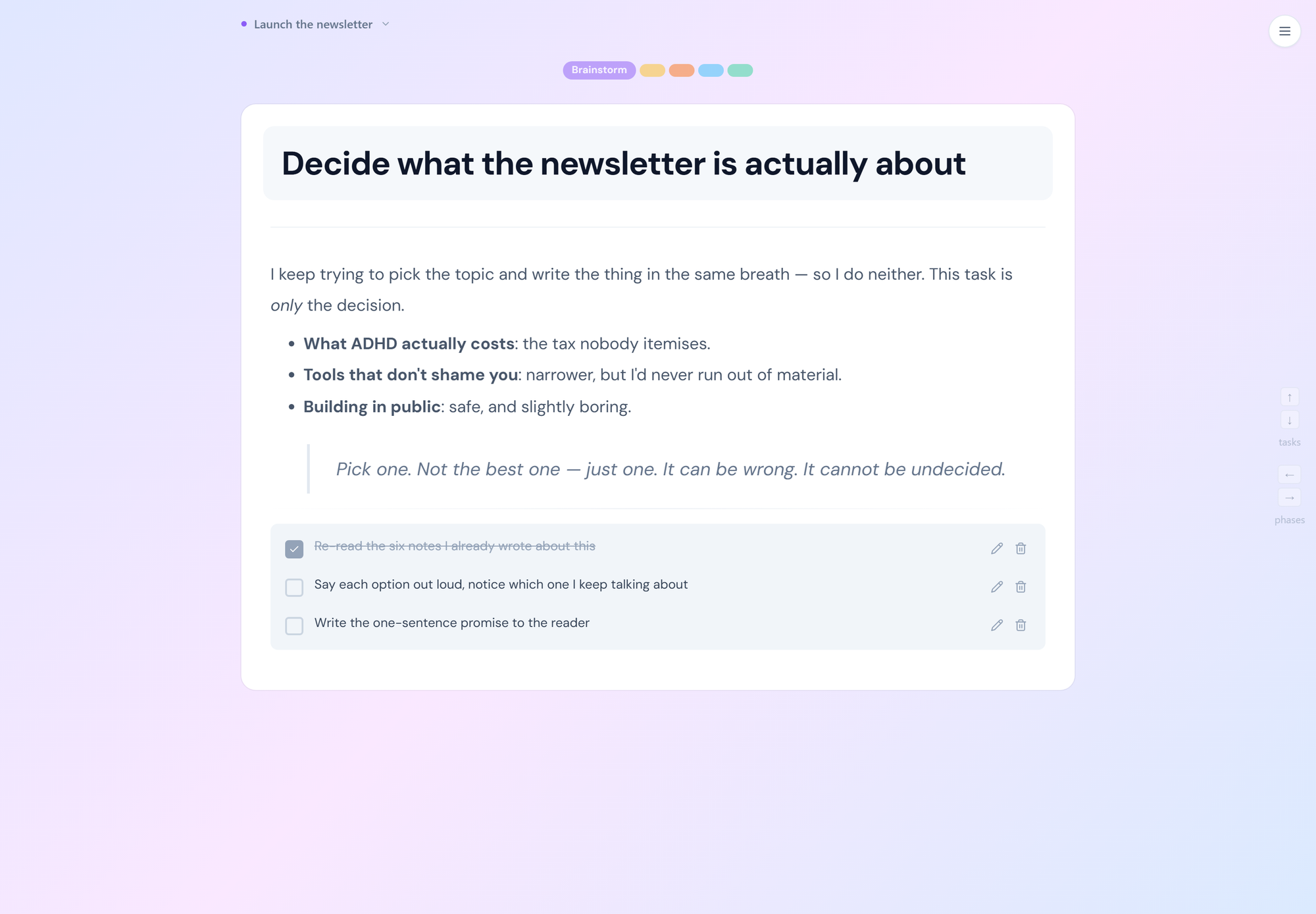
Take your hand off the mouse. Two seconds later, so does the noise. Watch what happens: the phases dim, the buttons dim, the other tasks dim, until one calm card remains. Yours. It's built on attention science, but here's what it really does: it removes the thousand tiny losing battles you'd otherwise fight today, and the verdict you'd hand yourself after each one.
Externalized.
The plan comes out of your head, and so does the blame for dropping it. Every plan you've ever "kept in your head" and lost: you charged that to your character, didn't you? Dr. Russell Barkley, the most cited ADHD researcher alive, proved the real story: ADHD brains can't reliably act on internal information. The fix isn't more discipline. It's a plan that lives on the screen, at the exact moment of action.
Right Now.
Every extra click is another chance for this project to join the pile. You don't abandon projects at the finish line. You abandon them in the tiny gaps: the loading screen, the buried menu, the seventeen clicks between wanting and doing. A meta-analysis of nearly 4,000 people shows ADHD brains heavily favor "now" over "later," so we built an app with almost no "later" in it.
Also inside: full keyboard navigation, spotlight menus, nested power features, phases, and everything else the big tools have. Just not in your face.
Never Lazy.
Read this twice: the science says it was never laziness. Meta-analyses confirm what you were never told as a kid: ADHD involves real, measurable differences in working memory, emotional regulation, and follow-through. Not attitude. Not effort. Not character. You've spent a lifetime compensating for tools and systems built for a different brain, so we built one for yours.
The Graveyard.
Every unfinished project is still down there, whispering. The half-built website. The course you bought. The garage, still not organized since 2022. You don't see a to-do list. You see a rap sheet, and research links that chronic pile-up of abandoned tasks to guilt, shame, and rumination. This app was built by someone with his own graveyard. Five tasks. One next step. Things that actually get to "done."
The Gap.
You know exactly how capable you are. That's what makes it hurt. The cruelest part of ADHD isn't the missed deadline. It's the distance between what you know you could do and what actually got done. Researchers studying late-diagnosed adults found people literally grieving "the lives they could have led." We can't give back the years. But we can shrink the gap, starting with the next task.
Every "Just."
Just focus. Just try harder. Just write it down. Just… stop. Psychiatrist Dr. William Dodson estimates kids with ADHD hear tens of thousands more corrective messages growing up than their peers, and qualitative research confirms adults with ADHD carry that internalized criticism for life. This app will never "just" you. No red badges. No guilt-trip streaks. No shame mechanics. It shows you one next step, and it believes you'll take it.
The Spiral.
Didn't start → felt awful → couldn't start → felt worse. Sound familiar? Longitudinal research mapped the exact loop you've been living: underachievement feeds a negative self-image, which feeds low mood, which makes the next task harder. Nobody escapes that loop with willpower. You escape it by changing the conditions. Fewer visible tasks. One next step. A first win, today.
Small Wins.
Confidence isn't talked into you. It's stacked, one finished thing at a time. Bandura's research, the foundation of modern psychology's take on confidence, found that nothing builds belief in yourself like actually completing things. Not affirmations. Completions. So this app is a completion machine: one visible task, one clear step, one more piece of proof that you're not who the bad days said you were.
Proof.
Your inner critic has a filing cabinet of evidence. Time to build your own. Every abandoned project got filed away as proof of who you are. Bandura's research says the counter-evidence is specific: mastery, meaning real tasks, really finished. This app is a proof-generator. Small tasks, visibly completed, stacking up day after day until the file marked "can't finish anything" quietly goes out of date.
How it works
There is no onboarding course. Three things, and you're looking at your first task.
1
Sign in and name your phases. Create a project and give it the phases your work actually moves through, or start from one of your saved templates. Brainstorm, Drafting, Review, Published. To Do, Doing, Done. Your call.
2
Add tasks. See one. Dump everything in. The app shows you one task with its notes and subtasks, and quietly queues the next five below it. The rest wait in their phases until you ask for them.
3
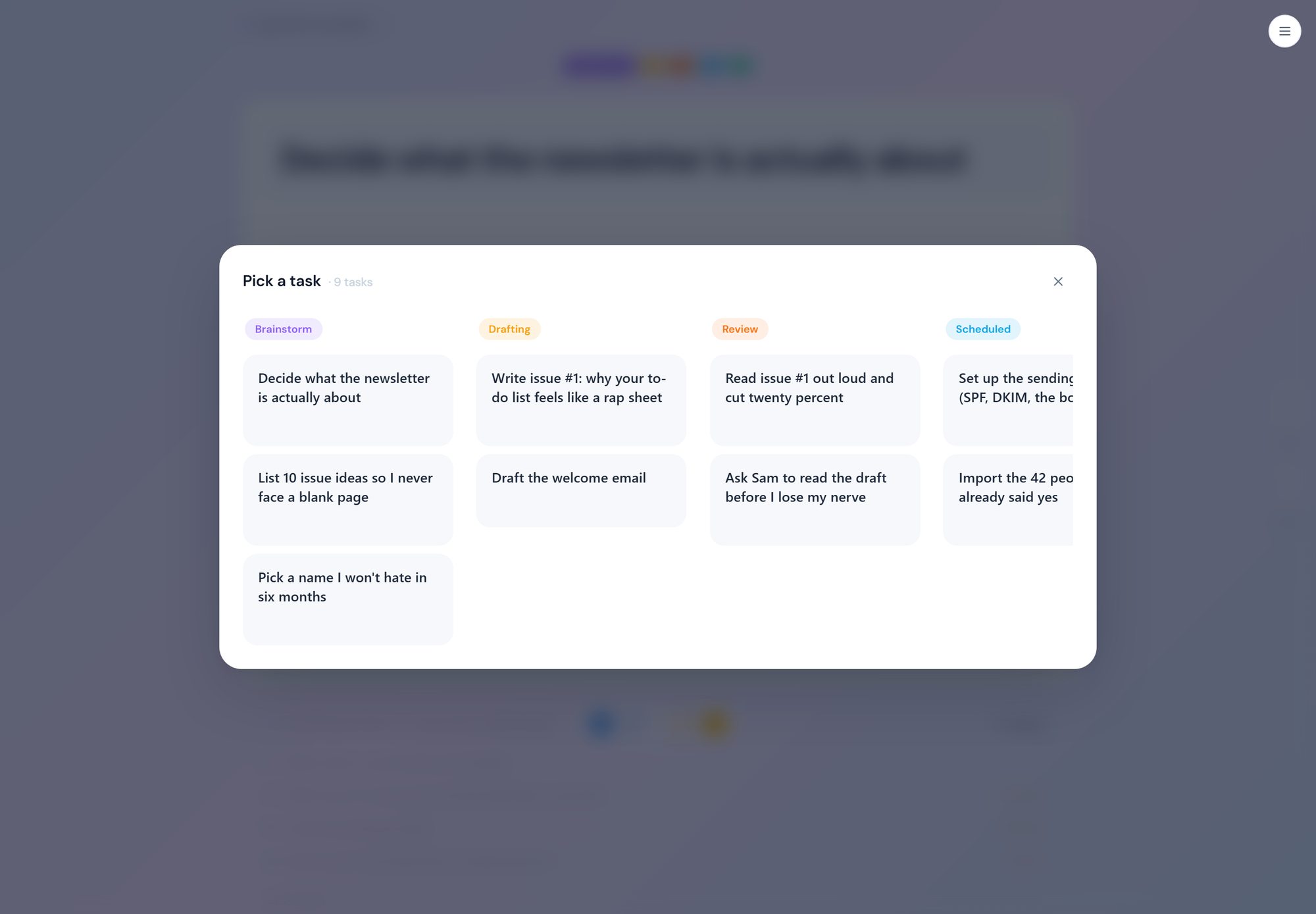
Finish it. The next one is already there. Mark it done, move it to the next phase, or pick a different one from the picker. Then take your hand off the mouse and watch everything but the card fade away.
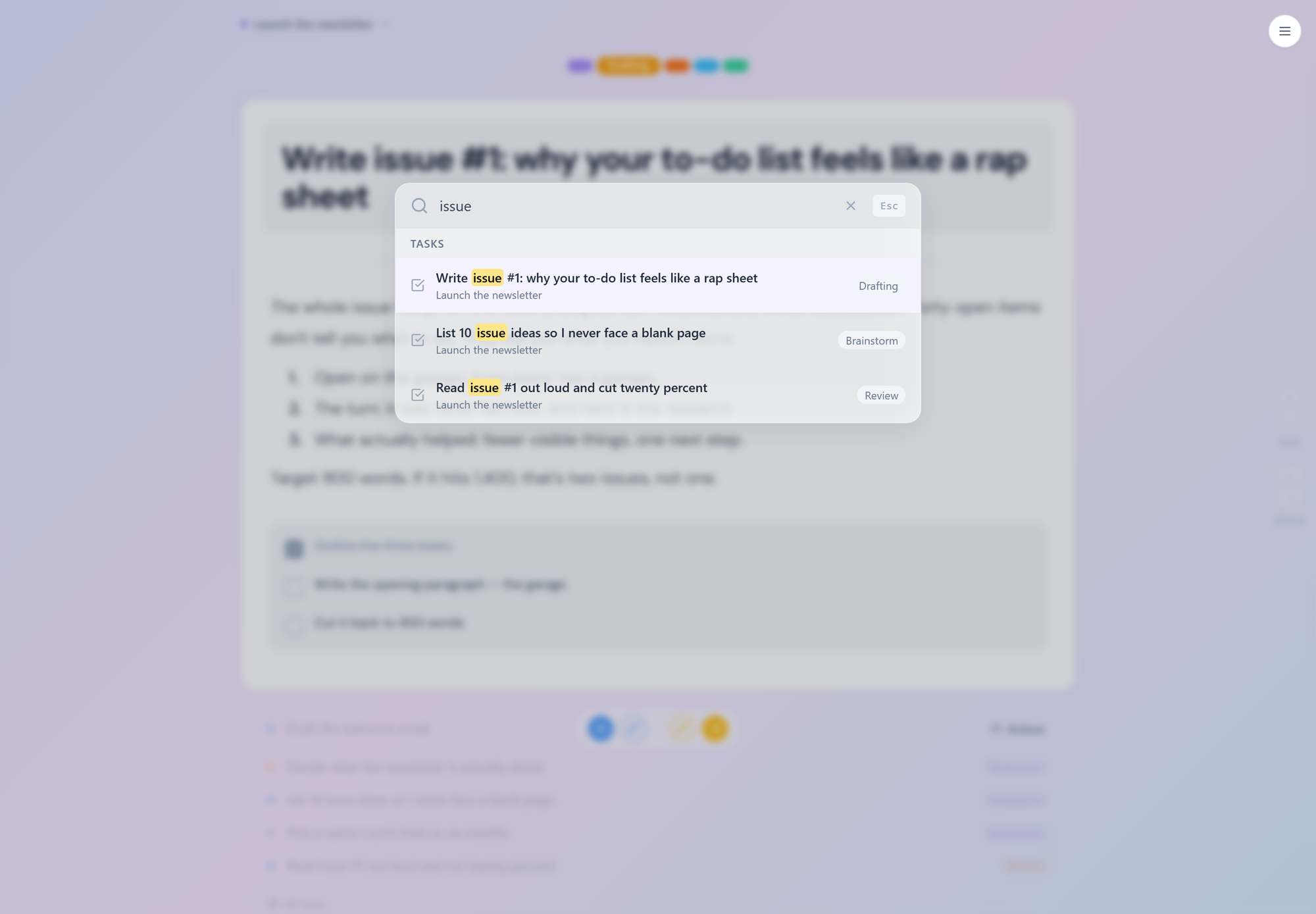
When you do want the list, it's one key away. The task picker, spotlight search, and phases instead of columns.
Start printing receipts.
Free during beta. One task on screen. The rest handled.
No credit card. No 47-field onboarding. We'll email you the moment a seat opens, and you'll be looking at your first task in under a minute.
The Science
Every design decision in Just One Done traces to published research. Here's a sample.
§
Only Five. We show five tasks because forty doesn't just slow you down. It wears you down. A meta-analysis of 7,202 people found that larger option sets suppress the decision to act, and longitudinal research shows that in ADHD, repeated non-starts feed a negative self-image over time. Chernev et al., 2015, J. Consumer Psychology; Eddy et al., 2015, J. Attention Disorders
§
Fade Away. Research shows that in ADHD, irrelevant on-screen items capture attention even under instruction to ignore them. The distraction is neurological, not moral. When your mouse goes still, everything but the current task fades to nothing. Frontiers in Psychology, 2014; Lavie, 1995, JEP:HPP
§
The Loop. A longitudinal study of students with ADHD found underachievement predicted later impairment through negative self-concept and depressive symptoms, a documented feedback loop. This application intervenes at the loop's most tractable point: it makes the next task radically easier to start. Eddy et al., 2015, J. Attention Disorders
§
Progress. Analyzing nearly 12,000 diary entries, Harvard's Amabile and Kramer found that progress in meaningful work, even small wins, outweighed everything else in shaping motivation. Bandura's research adds that mastery experiences are the strongest builder of self-belief. This app is engineered to manufacture exactly those two things, daily. Amabile & Kramer, 2011, The Progress Principle; Bandura, 1977/1997
So do we. All of them are still in there; the app just doesn't show you all of them at once. You get one task on screen and the next five queued below it. Everything else waits in its phase where it can't do anything to you. Nothing is deleted, nothing is lost. It's just not in the room.
What happens to my other forty tasks?
They sit quietly in their phases. You can see the whole list any time: hit "All Tasks" and the full board opens. The point isn't to hide your work from you. It's to stop your work from ambushing you every time you open the app.
Isn't this just a to-do list with fewer features?
It has phases, subtasks, priorities, recurring tasks, spotlight search, saved phase templates, and full keyboard navigation. It's a real project manager. The difference is that it doesn't put all of that in your face on load. The power is nested, not absent.
What is "auto-dim" actually doing?
When your mouse and keyboard go still for two seconds, the interface fades: the phase pills drop to half opacity, and the toolbar and the upcoming-task queue fade out entirely. One white card is left. Move the mouse and everything comes back in about a third of a second. It's not a mode you switch on. It just happens.
Won't the dimming be annoying?
It comes back the instant you move the mouse or press a key, in a 350 millisecond fade, so it stops registering quickly. There's no switch to turn it off yet. If it genuinely bothers you, say so; that's exactly the kind of feedback the beta is for.
Does it nag me? Streaks, red badges, "you're behind" emails?
No. No streaks, no red badges, no guilt notifications, no "you haven't opened the app in 3 days." The entire product thesis is that you have had enough of that. There is nothing in here designed to make you feel bad in order to make you engage.
Does it work on mobile?
It's a web app, so it opens in a phone browser, but it's built desktop-first. The keyboard and mouse features, like auto-dim and the task queue under the card, are desktop things. There is no native mobile app.
Can I use it entirely from the keyboard?
Yes. Spotlight search on Ctrl+K, arrow keys to move between tasks and phases, and shortcuts for the common actions. You never have to reach for the mouse, which, conveniently, is also when the interface dims.
How do I get an invite?
Press Request an Invite and leave your email. When a seat opens you'll get an email with a link to create your account. We're letting people in slowly, in small batches, because we want to actually answer everyone who writes in.
It's in beta. Is my data safe? Will you lose my stuff?
Your projects and tasks live in a Postgres database on a server we run, behind Cloudflare, and only you can see them. It is a beta run by one person, so please don't make it the only copy of anything you can't afford to lose yet. If you want a copy of your data, or want it deleted, email [email protected] and it will be done. If the project ever shuts down, you'll get notice and a way to take your data with you first.
Do I need an ADHD diagnosis to use this?
No. Nobody's checking, and nothing in the app asks. It was designed around how ADHD brains actually work, but "show me less, tell me the next step" is not a niche need. Plenty of people without a diagnosis find the full-list view just as flattening.
Is this a treatment? Will it fix my ADHD?
No. Just One Done is a productivity tool, not a medical device or a treatment for any health condition. It can't treat depression, anxiety, or ADHD, and it doesn't claim to. What it can do is stop being one more thing that makes the day heavier. If you're struggling with your mental health, please talk to a qualified professional.
Heavier.
For adults with ADHD, this was never merely about productivity. The research is unambiguous: adults with ADHD face roughly 4.5× the odds of major depression and 5× the odds of an anxiety disorder, alongside measurable impacts on income and employment. A task manager cannot treat any of that, and this one doesn't claim to. What it can do is stop adding to the load, and start subtracting the daily overwhelm that makes everything heavier. I built Just One Done because I have ADHD, I have my own graveyard of abandoned projects, and every project manager I tried was built for someone else's brain. This one is built for ours.